Drop Down Menu Sample
Overview
CSS3 is changing how we build websites. Even though many of us are still reluctant to start using CSS3 due to the lack of support in some browsers, there are those out there that are moving forward and doing some amazing stuff with its cool new features. No longer will we have to rely on so much JavaScript and images to create nice looking website elements such as buttons and menu navigations.
You can build a cool rounded navigation menu, with no images and no Javascript, and effectively make use of the new CSS3 properties border-radius and animation. This menu works perfectly well with Firefox, Opera, Chrome and Safari. The dropdown also works on non-CSS3 compitable browsers such as IE7+, but the rounded corners and shadow will not be rendered. CSS3 transitions could one day replace all the fancy jQuery animation tricks people use.
How to use

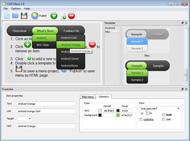
1) Open Drop Down Menu software and click "Add item"
and "Add submenu"
buttons situated on the Drop Down Menu Toolbar to create your menu. You can also use "Delete item"
to delete some buttons.
2) Use ready to use Templates. To do it just select theme you like in the "Templates" list. Double-click the theme you like to apply it.

3) Adjust appearance of the menu.
3.1. Select item by clicking it and change button appearance for normal and hover states and set buttons link properties and link target attributes on the "Main menu" tab.
3.2. Select submenu's item by clicking it and change submenu's appearance for normal and hover states and set submenu's item link properties and link target attributes on the "Submenu" tab.

4) Save your menu.
4.1. Save your project file. To save project just click "Save"
button on the Toolbar or select "Save" or "Save As
" in the Main menu.
4.2. Publish your menu in the HTML format. To do it click "Publish"
button on the Toolbar.
Free Download
CSS3Menu is free for non-commercial use. If you want to use CSS3Menu on a school site, your non-commercial blog or non-profit organisation website, just download CSS3Menu and use it for free.
A license fee is required for commercial use. CSS3Menu Commercial Edition additionally provides an option to create multicolumn menus and includes extended sets of menu templates and icons. After you complete the payment via the secure form, you will receive a license key instantly by email that turns the CSS3Menu Free Edition into a Commercial one. You can select the most suitable payment method: credit card, bank transfer, check, PayPal etc.
Support
For troubleshooting, feature requests, and general help, contact Customer Support at

. Make sure to include details on your browser, operating system, Drop Down Menu version, link to your page.
popup dropdown menu flex
Templates
-
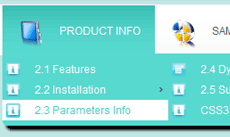
Mulicolumn Blue Menu

See live demoCustom Drop Down Menu
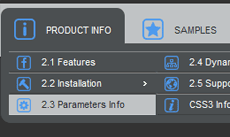
Modern Dark

See live demoDropdown Menu In Iweb
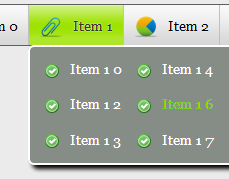
Fresh Seaweeds Menu

See live demoDrop Down Menu Word
Screenshot
Features
-

100% CSS-driven designs
The menu is based on HTML list of links (UL/LI structure) and CSS only. No additional non-css params are used.

Cool CSS3 properties
Multi-level dropdown menu is created using border-radius, box-shadow, and text-shadow.
free dropdown menu bars
Opacity, backround and font colors, linear and radial gradients are also supported.
Contact us
-
For troubleshooting, feature requests and general help contact Customer Support at

. Make sure to include details on your browser, operating system, jQuery Carousel version and a link (or relevant code). css drop down menu transparent free code
Feedback
-
* Let me start just congratulating you, good job, really. I am trying out the free version before I buy it. It works great.
* I have downloaded your CSS3Menu tool and like what I've seen so far. It's so much simpler and cleaner than other attempts, definitely something I would use in my design work. So far I love it
* Great product by the way and saved me loads of time. I really like your Css3 Menu program! Very nice.
Awards
Dropdown Menu Images Blogs
http://www.google.com/support/forum/p/blogger/thread?tid=2438d279c9c19a1d&hl=es
$(function
Podes usar o menú dropdown se quere - vBET ten construír en soporte para engadir lo en navbar. "vbet-flag vbet-{vb:raw flag.code}" width="16" height="11" src="images/vbet/flags/clear.gif" alt="{vb:var flag.name}"
Menú con tabs con CSS, jQuery y Mootools En este artículo veremos el proceso para crear un menú con tabs y cómo hacerlo funcionar mediante CSS y con la ayuda de Javascript. menuholder a {background:url(images/menu-options.gif);display:block; height:36px; text-indent:-9000
Tweet Tweet!
See Also
Fusion Menu is primarily a javascript enhanced CSS dropdown menu, that combines standard suckerfish type functionality with animations, Images sources are available, in addition to any fonts, from the Nebulae download area
Fundacion tripartita. Formación continua. Cursos a distancia,presencial y online. Información y Multiple Dropdown Menu [feature2img="images/stories/demo/product2.jpg" title="Light & Dark" label="Read More"]Meridian has 4 inbuilt styles, these are light, blue, beige
Tony Postigo - Official Website It is primarily a javascript enhanced CSS dropdown menu, that combines standard suckerfish type functionality with animations, transitions and All images and materials are the copyright of their respective owners
Los menús dropdown son ideales para hacer entrar varias categorías y páginas anidadas, que por obvia falta de espacio en un menú común se nos puede suckerfishnav { background:#9C1F1B url("../multi-level-navigation-plugin/images/suckerfish_red.png") repeat-x; font-size:18px; font-family:
animate blog circular css css3 dropdown easing ejemplos flowplayer form frameworks jmars jquery menu newsticker novedades plugin plugins scripts 176px; position:absolute; left:0; top:0; background:transparent url(../images/circle.png) no-repeat top left; z-index:10; opacity:0; filter:
CuPath:"g C/", --> the pathVfor the g Cus on the leftrof the menu voice ha Images:true, --> if the menuvoices have an g Cu (a space on the { dropdown:"honew_extu/ajaxuextuVoices.php", addta httpDkea:"_keatesL=tesL", menuWidth:180, onenOnRight:false, menuSelector: ".menu Serainer"
CSS only flyout/dropdown menu : at CSS Play. CSS only flyout menu with transparency : at CSS Play. CSS only CSS Tabs : tabs without any images. CSS Tabs : list of various tab solutions. CSS tabs with Submenus : at Kalsey. dTree Navigation Menu : Javascripts Tree at Destroydrop
En blog perfume he encontrado un bonito diseño de un theme para Wordpress titulado Scarlett Theme. A nivel de diseño no me atravo a comentar mucho, salvo Multi-level dropdown javascript navigation menu. Custom sliding elements with images. Site wide customizable 125 x 125 custom banner ads
Clean, standards-friendly, modular framework for dropdown menus Most of the images are courtesy of: worldcoingallery.co m. Actualizado / Updated 15 Abril 2009. Mi coleccion. Hola, mi nombre es Rafa y colecciono monedas de todo el mundo (por tipo) y también billetes, pero en este
dropdown, memoria, falla, recopilaciones, creativos, bitacoras, texturas, dropdown menu, drop down menus, relativamente Jquery Labs Form Scroll Gallery Animation Style Plugins Css Input Drop Like games Menu .net Tympanus.net jQuery UI Lightbox Follow User Load Tutorials images Box
You can build a cool rounded navigation menu, with no images and no Javascript, and effectively make use of the new CSS3 properties border-radius The dropdown also works on non-CSS3 compitable browsers such as IE7+, but the rounded corners and shadow will not be rendered
Display all Google services as buttons or as a space-saving dropdown menu next to your address bar. Browse faster -- Preview links and images without leaving your current page or tab. Just mouseover any link, and a separate preview window appears to show you the content
It is primarily a javascript enhanced CSS dropdown menu, that combines standard suckerfish type functionality with animations, transitions and demo with RocketLauncher, which includes the template, extensions, sample images and data. More Information. Site Poll. Joomla! is used
Joomla! - el motor de portales dinámicos y sistema de administración de contenidos Fusion is a Mootools enhanced CSS dropdown menu system, that is fully crawlable by search engines, and packed with advanced features. All images and materials are the copyright of their respective owners
Html5 Menu. Create Fancy CSS3 Dropdown Menu in a Few Clicks! No JavaScript, No Images, No Flash : CSS Only! Css For Menu Style Elliptical Gradient Multi-level dropdown menu is created using border-radius, box-shadow, and text-shadow. Opacity, backround and font colors, linear and
You can build a cool rounded navigation menu, with no images and no Javascript, and effectively make use of the new CSS3 properties border-radius The dropdown also works on non-CSS3 compitable browsers such as IE7+, but the rounded corners and shadow will not be rendered
Fusion is javascript-based dropdown menu system, with extensively functionality. This site makes use of copyright materials, strictly for demo purposes, such as images and text. Refer to the respective sources for more details. BBC - News & Images
Dropdown menu setup. JstuffJDefaults. What's New in 1.5? Web Links. More about Joomla! The News. Joomla! License. FAQ. Contact us. News Feeds. subirarti. YouScene Slider Images are copyright of their respective owners. Fusce lorem mi, scelerisque nec iaculis at, consectetur sodales erat
CSS 3 Mega Dropdown Menu Tutorial, es un bonito tutorial para aquellos que venían pensando mejorar el menú de sus clientes. 120 bonitos ejemplos de Menu Horizontales con CSS. Clipart design: Mas de 500 free vector images. Crear galerías de imágenes profesionales con Picasa
[SKIN] Remove unneeded images [SKIN] Unified OBGridLinkButton and OBLinkButton green color [SKIN] Unified pencil dropdown menu separator color of myOB widget [SKIN] Unified funnel icon green background color [SKIN] Unified ApplicationMenu green color
Veerle's blog: 2 level horizontal navigation in CSS with images. TJK design CSS-based Dropdown with a twist. aplus :: ADxMenu. CSS Menu with tootips without javascript Accessible Dropdown menu. gazingus.org - Using Lists for DHTML Menus, (2) Apycom DHTML Menu: Cascading Drop Down
name="description" content="Free4all menu">
It's easy to create these sub-pages, and the theme automatically lists them in the dropdown menu for you. It's really that easy! Full page control, including custom headlines and sub-headlines for each page. Pre-styled content for all content types, including images, bold, italic, bullets, etc
22 scripts de Administración de contenido en esta categoría: Cute Editor for .NET - ASP.NET HTML Editor, SPAW Editor ASP .NET Edition, with many features, like a dropdown menu with every table functionality you could wish for and inserting images is possible as well of course
1- CSS3 Dropdown Menu. 2- Pure CSS3 Download Button. 3- CSS3 Gets a New Logo. 4- Advanced CSS3 Menu. 5- Amazing CSS3 19- Rotating Images With CSS3. 20- CSS3 tyle Sliders. 21- My Notes With Html5 CSS3 jQuery. 22- Create a CSS3 Menu Using moz border radius. 23- CSS3 popup links
Select from either: the Fusion Menu, a javascript / Mootools enhanced CSS dropdown menu system, SEO compatible and user friendly; and the Javascript popup / litebox utility, can be used for images, links, videos, websites, PDFs and much more. RokAjaxSearch Module
Exploding-boy CSS Tabs Menus – list of various style free tabs menu created by designer Christopher Ware. CSS Based Navigation Pure CSS horizontal Drop Down Menu – simple CSS dropdown sub-menus. Hoverbox Menu – uses images replacement techniques. Accessible Image-Tab Rollovers
Overview
How to Use
Demos
Android
Android Dark
Android Orange
Android Blue
Android Green
Android Rose
Mac Style
Mac Grey
Mac Dark Green
Apple
Apple Black
Apple Blue
Blocks Style
Elegant Style
Fresh Style
Neon Style
Frame Style
Download


Item 0
Item 1
Item 1 0
Item 2
Item 3