Drop Down Menu Sample
Overview
CSS3 is changing how we build websites. Even though many of us are still reluctant to start using CSS3 due to the lack of support in some browsers, there are those out there that are moving forward and doing some amazing stuff with its cool new features. No longer will we have to rely on so much JavaScript and images to create nice looking website elements such as buttons and menu navigations.
You can build a cool rounded navigation menu, with no images and no Javascript, and effectively make use of the new CSS3 properties border-radius and animation. This menu works perfectly well with Firefox, Opera, Chrome and Safari. The dropdown also works on non-CSS3 compitable browsers such as IE7+, but the rounded corners and shadow will not be rendered. CSS3 transitions could one day replace all the fancy jQuery animation tricks people use.
How to use

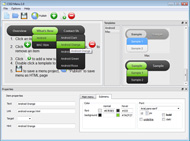
1) Open Drop Down Menu software and click "Add item"
and "Add submenu"
buttons situated on the Drop Down Menu Toolbar to create your menu. You can also use "Delete item"
to delete some buttons.
2) Use ready to use Templates. To do it just select theme you like in the "Templates" list. Double-click the theme you like to apply it.

3) Adjust appearance of the menu.
3.1. Select item by clicking it and change button appearance for normal and hover states and set buttons link properties and link target attributes on the "Main menu" tab.
3.2. Select submenu's item by clicking it and change submenu's appearance for normal and hover states and set submenu's item link properties and link target attributes on the "Submenu" tab.

4) Save your menu.
4.1. Save your project file. To save project just click "Save"
button on the Toolbar or select "Save" or "Save As
" in the Main menu.
4.2. Publish your menu in the HTML format. To do it click "Publish"
button on the Toolbar.
Free Download
CSS3Menu is free for non-commercial use. If you want to use CSS3Menu on a school site, your non-commercial blog or non-profit organisation website, just download CSS3Menu and use it for free.
A license fee is required for commercial use. CSS3Menu Commercial Edition additionally provides an option to create multicolumn menus and includes extended sets of menu templates and icons. After you complete the payment via the secure form, you will receive a license key instantly by email that turns the CSS3Menu Free Edition into a Commercial one. You can select the most suitable payment method: credit card, bank transfer, check, PayPal etc.
Support
For troubleshooting, feature requests, and general help, contact Customer Support at

. Make sure to include details on your browser, operating system, Drop Down Menu version, link to your page.
drop down menu replacement automatically javascript php
Templates
-
Mega Menu

See live demoBeautiful Dropdown Menu
Toolbars Grey

See live demoDrop Down Menu Flash Cs3
Neon Blue Menu

See live demoAbove Dropdown Menu
Screenshot
Features
-

SEO friendly
Search engines and text-only browsers friendly.

Browser support
Supports all modern browsers (except IE6).
css dropdown menu arrow image
Contact us
-
For troubleshooting, feature requests and general help contact Customer Support at

. Make sure to include details on your browser, operating system, jQuery Carousel version and a link (or relevant code). drop down submenu horizontal
Feedback
-
* I have installed CSS3 Menu Free. All good, loving it!! I want to get an business version of your great programm. I love it - soo easy to use!!
* I first must say that after a few days of lost time trying to figure out some other ways to do this stuff, landing on your website to find and use your great little utility for css3 menus was just wonderful! You have made a complicated task look quite easy... lots of work behind your took I'm sure.
* Firstly - My gratitude for a menu wizard that is lightweight, incorporates a variety of new CSS properties, is easily customizable but comes with a more than sufficient collection of examples and finally - degrades in MSIE (my IE6.0 displays the menus nicely). Thanks again - I have already recommended you to a friend.
Awards
Drop Down Menu Mootools Blogs
Tweet Tweet!
See Also
Animated Drop Down Menu – Con jQuery y Css. Publicado por Nikko el dia 16 Dec 2008 - Guardado en CSS, Scripts, jQuery Leido 18,522 Veces Mootools (3) Open Source (4) Patterns (19) Personalización (10) Photoshop (29) php (7) Porfolios (2) Programacion (9) Recursos Web (135) Rss & Mail (6)
Usar el jquery.dropdown.js en caso de tener instalado jQuery en nuestra página, y no olvidarse de borrar el script de mootools en Google ya que que escribir ;-D y arreglar sobre todo un error que tienes en tu css dropdown. ( en el menú categorías). Un saludo man. Apenas recupere:
jquery, drop down, wordpress, feed, menu drop, eliseos, mene, llama, visitante, twitter, good design iconos imagenes interfaz Javascript jQuery lightbox menu mootools navegadores PHP plantillas plugin plugins. El mejor drop libre descarga. ¡ La rápida acción del Tetris se
The former is an advanced CSS dropdown menu, enhanced with transitions and animations, powered by Mootools. A CSS dropdown menu, enhanced with animations, transitions, and other advanced effects powered by Mootools, and is search engine crawlable
Joomla! - el motor de portales dinámicos y sistema de administración de contenidos Select from either: the Fusion Menu, a javascript / Mootools enhanced CSS dropdown menu system, SEO compatible and user friendly; and the
Zaragoza Online Web Resources Zaragoza Drop Down Menu. Escrito por Ciro. Zaragoza Drop Down Menu is an adaptation of UvumiTools Dropdown Menu, a very simple multi-level drop down menu using Mootools 1.2 Javascript
Use Sprites to Create an Awesomeness-Filled Navigation Menu. Thumbnails Navigation Gallery with jQuery. Sexy Drop Down Menu w/ jQuery & CSS How To Create A Mootools Homepage' Inspired Navigation Effect Using jQuery. Animated Drop Down Menu with jQuery. Horizontal Subnav with CSS
VERDE Y NATURAL / IATENA: cursos presenciales y a distancia de terapias naturales. Cursos de terapias naturales para profesionales de la salud. en Terapias Naturales. Fusion Menu. Mootools Powered CSS Dropdown Menu. A javascript enhanced menu, which is fully compatible with
Aquí os traigo un Listado con 48 Alucinantes y magnificos Scripts para usar con Mootools: Mootools version: 1.2 Mootools Ext Fancy Menu. Mootools :: Drop Menu example. UvumiTools drop down menu. Drop Down Menu. MenuMatic - Drop Down Menu. PathFusion : image menu. Calendar (date picker)
7. Perfect signin dropdown box likes Twitter with jQuery. Ver la demo. 8. Sliding Jquery Menu Tutorial. Ver la demo. 9.Fancy Sliding Menu for Mootools 28. Styling Drop Down Boxes with jQuery. Ver la demo. 29. jQuery iPod-style Drilldown Menu. Ver la demo
dropdown menu, that combines standard suckerfish type functionality with animations, transitions and other advanced effects provided by Mootools. Evenly: If there are 7 menu items in 3 columns, Fusion will allocate a 3,2,2 distribution - trying to equalize each dropdown
Menu Types. Fusion Menu. A Mootools enhanced CSS dropdown menu, with multi-columns, icons and more. SplitMenu dropdown menu, that combines standard suckerfish type functionality with animations, transitions and other advanced effects provided by Mootools
Somos una empresa dedicada a la construcción de Pérgolas, Decks, Terrazas Españolas, casa y juegos infantiles. The Fusion Menu is a CSS driven dropdown menu; enriched, animated and empowered by the Mootools javascript library. { LEER MÁS } Titulo2 Juegos Infantiles
En devsnippets comentan que los menús de navegación ayudan a los usuarios a moverse por nuestras páginas, en ellos BDC DrillDown Menu. AJAX Dropdown Tab Menu. Mootools animated sidebar menu. Using jQuery for Background Image Animations. Simple Animated Menu for Mootools 1.2
It is a javascript enhanced CSS dropdown menu, that combines standard suckerfish type functionality with animations, transitions and other effects via Mootools. features, such as grouped items and inline modules, to the Fusion dropdown menu. Mas Detalles. Imagen Corporativa Flash
Menú creado en JavaScript con la forma y el diseño así como el funcionamiento de los menus que nos encontramos en nuestro Windows XP. Mootools. Sección de scripts + Portada + Envía tu script + Búsqueda de scripts + Ayuda + Descargar scripts. Donaciones
Idle Spy para Mootools controla la carga de tu web según la interacción de tus usuarios (0) 34 hojas de trucos sobre Free Css Drop-Down Menu – Crea tus menus desplegables fácilmente (0) Fotogaleria con PHP, jQuery y AJAX (1) Libro de mano online para desarrolladores web (0)
ForMoo – Form Tools for Mootools. MOOdalBox – an HTML Lightbox. Javascript Fisheye Example. FancyUpload – Swiff meets Fancy Menu. Mootools :: Drop Menu example. UvumiTools drop down menu. Drop Down Menu. MenuMatic – Drop Down Menu. PathFusion : image menu. Calendar (date picker)
web que debes tener en cuenta. Creados con CSS y algunos combinando mootools. Ejemplo 1 (descarga) Example 2 (descarga) Menu dropdown (lista desplegable) y dropline (lista horizontal) en CSS. 10 menus horizontales con CSS. Menús web con CSS y mootools. 3 nuevos menús en CSS
Joomla! - el motor de portales dinámicos y sistema de administración de contenidos Menu Theme. Fusion Menu. The Fusion Menu is a CSS driven dropdown menu, enriched by the Mootools javascript library
Link: 14 Easy to Implement Drop Down Menu Solutions [ LEER MÁS] Crear tooltips con la magia de jQuery. 2/04/09. Publicado enDiseño . Javascript . jQuery iconos imagenes interfaz Javascript jQuery lightbox menu mootools navegadores PHP plantillas plugin plugins premium
Free CSS Drop-Down Menú Framework es un Framework CSS para crear menús desplegables fácilmente con listas. Su flexibilidad da la Mootools (8) Moviles (2) MySQL (15) Optimización Web (4) PHP (72) Prototype (6) Redes Sociales (17) SEO (15) Tecnología (14) Twitter (16) Wordpress (30)
4 Excelentes plugins gratis implementados con Mootools que permite implementar: galerías de imágenes, recorte de imágenes, menús tipo MooTools Dropdown Menu. Implementar un menú descolgable multinivel y con una vistosa animación es muy fácil con este plugin que se destaca por:
InForceHsot. Hosting en México, ofrecemos los mejores planes, precios, soporte y formas de pago para todos nuestros clientes. It is a javascript enhanced CSS dropdown menu, that combines standard suckerfish type functionality with animations, transitions and other effects via Mootools
Overview
How to Use
Demos
Android
Android Dark
Android Orange
Android Blue
Android Green
Android Rose
Mac Style
Mac Grey
Mac Dark Green
Apple
Apple Black
Apple Blue
Blocks Style
Elegant Style
Fresh Style
Neon Style
Frame Style
Download


Item 0
Item 1
Item 1 0
Item 2
Item 3