Drop Down Menu Sample
Overview
CSS3 is changing how we build websites. Even though many of us are still reluctant to start using CSS3 due to the lack of support in some browsers, there are those out there that are moving forward and doing some amazing stuff with its cool new features. No longer will we have to rely on so much JavaScript and images to create nice looking website elements such as buttons and menu navigations.
You can build a cool rounded navigation menu, with no images and no Javascript, and effectively make use of the new CSS3 properties border-radius and animation. This menu works perfectly well with Firefox, Opera, Chrome and Safari. The dropdown also works on non-CSS3 compitable browsers such as IE7+, but the rounded corners and shadow will not be rendered. CSS3 transitions could one day replace all the fancy jQuery animation tricks people use.
How to use

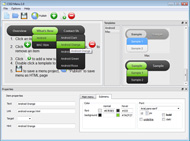
1) Open Drop Down Menu software and click "Add item"
and "Add submenu"
buttons situated on the Drop Down Menu Toolbar to create your menu. You can also use "Delete item"
to delete some buttons.
2) Use ready to use Templates. To do it just select theme you like in the "Templates" list. Double-click the theme you like to apply it.

3) Adjust appearance of the menu.
3.1. Select item by clicking it and change button appearance for normal and hover states and set buttons link properties and link target attributes on the "Main menu" tab.
3.2. Select submenu's item by clicking it and change submenu's appearance for normal and hover states and set submenu's item link properties and link target attributes on the "Submenu" tab.

4) Save your menu.
4.1. Save your project file. To save project just click "Save"
button on the Toolbar or select "Save" or "Save As
" in the Main menu.
4.2. Publish your menu in the HTML format. To do it click "Publish"
button on the Toolbar.
Free Download
CSS3Menu is free for non-commercial use. If you want to use CSS3Menu on a school site, your non-commercial blog or non-profit organisation website, just download CSS3Menu and use it for free.
A license fee is required for commercial use. CSS3Menu Commercial Edition additionally provides an option to create multicolumn menus and includes extended sets of menu templates and icons. After you complete the payment via the secure form, you will receive a license key instantly by email that turns the CSS3Menu Free Edition into a Commercial one. You can select the most suitable payment method: credit card, bank transfer, check, PayPal etc.
Support
For troubleshooting, feature requests, and general help, contact Customer Support at

. Make sure to include details on your browser, operating system, Drop Down Menu version, link to your page.
js drop down menu for blueprint
Templates
-
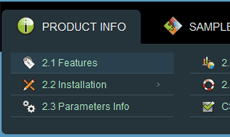
Simple Blue

See live demoIweb Vs Rapidweaver
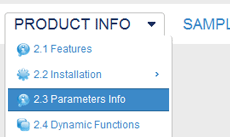
Fresh Seaweeds Menu

See live demoCss3 Drop Menu
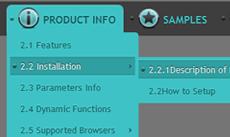
Elegant Dark

See live demoFree Drop Down Menu Bar
Screenshot
Features
-

Cool CSS3 properties
Multi-level dropdown menu is created using border-radius, box-shadow, and text-shadow.
Opacity, backround and font colors, linear and radial gradients are also supported.
No Javascript is required
Works in browsers with disabled Javascript or if a browser has no Javascript support at all.
mootools dropdown menu iphone
Contact us
-
For troubleshooting, feature requests and general help contact Customer Support at

. Make sure to include details on your browser, operating system, jQuery Carousel version and a link (or relevant code). magento drop down menu bar like admin
Feedback
-
* Just stumbled across your programme...brilliant! I am no web expert but have built a nice menu. It looks great!
* Another programmes have incredible functionality but no fantastic interface like your product!
* I'm absolutely loving Css3 Menu. Amazing, quick and painless, to create a custom, browser independent menus. And it works first time - every time! Best value for money I've seen in quite a while...
Awards
Css Dropdown Menu List Blogs
Opera-Info.de - Deutsche Opera-Community für den Opera-Browser unter Windows, Linux und Mac RE: Button Dropdown-Menü für alle geöffneten Tabs. Den habe ich mal zusammengebastelt, Meinst du so etwas? [BUTTON=Show popup menu, "Internal Window List" ]Liste[/BUTTON] Mit O-Symbol
Es basiert auf eine älteres Modul "Dropdown Menue" und ist dem vom Otto Versand bzw. in Sachen PHP und CSS. Anleitung Einbindung Dropdown Menu. Angepasst für xtcModified 1.05
Hallo Community, Ich möchte den Script benutzen um die Menüs untereinander zu setzen, jeweils aber als einer Mouseover wie Buttons. Das Problem ist
[Archiv] DropDown Menu nach links öffnen und anderes CSS
Schnelle Hilfe zu deinen TYPO3 Fragen findest du in unserem TYPO3 Forum. Ob TYPO3-Anfänger oder -Profi, hier findet jeder etwas I was wondering if anyone could help me with my dropdown menu in css within typo3
hidden when you hover on second level list OR link */ .menu ul :hover ul :hover ul ul{ visibility:hidden; } /* Von mir */ /* keep the fith level ich bin durch Zufall auf eine andere CSS DropDown Seite gestoßen aber als ich es da endlcih an der passenden Stelle hatte hat
[Archiv] Seite 34 Fragen und Antworten zu HTML, CSS und JavaScript. "http://forum.chip.de/html-css-javascript/frames-leeren-437081.html">Frames "leeren"
Du suchst nach Mods/Addons, Templates, Tutorials oder Hilfestellungen für das deV!L'z Clanportal? Dann besuch uns!
Hallo, ich habe auf Basis vom YAML ein Joomla-Template erstellt. Leider bietet YAML aber kein Dropdownmenü. Gibt es ein gute Lösung für Joomla 2. dropdown.css @charset "UTF-8"; /** * Horizontal CSS Drop-Down Menu Module * * @file dropdown.css * @package Dropdown * @version 0.7.2 * @type
Mehrere Seiten auf Blog einrichten http://bloggersentral.blogspot.com/2009/10/installing-multi-level-css-dropdown.html. Fanden Sie diese Antwort hilfreich? Zur Abstimmung anmelden
Hallo an alle, Im Grafik-Designer. Haben ein paar HTML-Seiten über Tradition, in Scheiben schneiden in grafischen Feuerwerk, dann Export in Dreamweaver. Im CSS lernen für
PHP-Fusion Deutschland ist die offizielle Support Seite des kostenlosen OpenSource CMS PHP-Fusion. PHP Fusion ist ein kostenloses Open-Source Content-Management-System
[Archiv] Seite 6 HTML-Fragen wie "Flash und HTML-Frames", JavaScript, PopUp-Fenster, Vollbild u.v.m.). Unterstützt von Marc Thiele
Code, um Dropdown-Menü mit Klick auf Body-Elemente zu schließen: //close menus whenever you click if the element clicked isn't the menu or inside the menu // and if the menu is visible. if
Das Forum für Apple iWeb Nutzer und all jene, die es werden wollen. CSS DropDown/Rollover Menu without Javascript This is a dhtml menu like rollover menus
SELFHTML Forumsarchiv September 2008: DropDown-Navigation: Problem mit Menüpunktbreite (CSS) DropDown-Navigation: Problem mit Menüpunktbreite von Ingo Turski,
ul#menu { list-style: none; padding: 0px; margin: 0px; } li#wand a { background: url(images/button_dunkelblau.gif) no-repeat; hier die html-datei und die css-datei. Meine ganzen Versuche habe ich jetzt mal rausgelöscht. Mein Problem
[Archiv] Du hast Fragen und Probleme mit der TYPO3 Menuerstellung? DropDown-Menü. Menu schliessen führt züruch auf Startseite. Submenü (3.Ebene) nur bei einem bestimmten Hauptmenüeintrag anzeigen
Webdesign, das Contentmanagement-System Joomla, Bildbearbeitung und vieles mehr, sind die Themen die im Forum besprochen werden. Schneller Support f_ r alle Leistungen von Ahadesign ist selbstverst_ ndlich
Ein komplett in CSS realisiertes Multilevel-Dropdown-Menü für alle Browser mit Unterstützung der CSS-Pseudoklasse ':hover' für beliebige Elemente (nich
HTMLWorld - Alles zum Thema Internetprogrammierung. Lernen Sie HTML, CSS, JavaScript, DHTML und andere Web-Sprachen richtig einzusetzen und mit Ihnen umzugehen. HTMLWorld ist Anlaufpunkt, Tutorial und Referenz in einem
Tweet Tweet!
See Also
Css Drop Und Down Menue. jQuery Menu. The most powerful Javascipt Menu/ DHTML Menu system on the Web. JQuery Dropdown Menu Unordered List
Inhalte von WordPress-Seiten werden immer komplexer und damit natürlich ihre Navigation. Eine schicke Sache für ein komplexes Navigationsmenü ist ein Dropdown-Menü. Mit diesem Aufrunf wird das Superfish-Plugin nun auf alle ungeordneten Listen mit der CSS-Klasse .sf-menu angewendet
Unordered List As DropDown Menu. This JavaScript creates dropdown menus out of unordered lists. OUTDATED. Many javascripts are dealing with this issue, but a lot tend to rely on complex html, or even js code to create a menu structure, which
Ajax List Menu Frameset Dropdown Menue. Behalten Sie Ihre Website schnell und gut strukturiert mit Javascript rollover Knöpfen Verbindungen!
Von Freizeitler unter CSS, mit Download. Die Suche hat ein Ende! Hier gibt's ein wirklich sehr leicht anzupassendes Dropdown-Menü ohne JavaScript. Es muss lediglich ein margin-Wert verändert und ein display:inline auf die Listenpunkte gelegt werden
Das Navigationsmenü von Kram-hochladen.de funktioniert zuverlässig in allen Browsern - sogar im Internet Explorer. Augenscheinlich sogar ohne Javascript und nur mit CSS, was aber, wenn man die IE betrachtet, nur bedingt stimmt. Aufgrund
Hallo alle miteinander Ich habe ein einfaches Dropdown-Menü gebastelt das später in einem Joomla! funktionieren soll. [b:y8tadhl8]Problem 1 (IE
Design Community - (X)HTML / CSS Tutorial: Simple Dropdown-Navigation mit HTML/CSS Schlüsserwörter: CSS Dropdown HTML Menu Menü navi navigation
Ich war auf der Suche nach einem ganz simplen DropDown Menue, auf reiner CSS Basis. Tags: css dropdown menu, dropdown no javascript, dropdown only css, dropdown menü
[Archiv] Seite 4 alles rund um Cascading Style Sheets. Von einfacher Schriftformatierung bis zum kompletten CSS-Layout
Heute zeig ich euch wie man ein einfaches horizontales Tab-Menü mit CSS erstellt. Der HTML Code: (Der Code kommt zwischen:
gibt es ein CSS Dropdown Menu (ohne JS), das im IE 5.0 läuft ? css/edge/menus/demo.html. Und zwar alleine schon aus dem Grund, weil IE :hover nur auf a erkennen
Fusion Menu is a menu theme of the RokNavMenu extension, the addon that drives all RocketTheme template menus. It is primarily a javascript enhanced CSS dropdown menu, that combines standard suckerfish type functionality with animations, transitions
Ein barrierefreies Typo3 Dropdown Menü erstellen mit TypoScript, JavaScript und CSS deswegen möchte ich da nicht weiter drauf eingehen. Ein paar wichtige und vielleicht verwirrende Zeilen hab ich dennoch kommentiert: ul.menu, ul.menu ul { list-style-type: none; ul.menu a { display: block;
Du suchst alistapart, A List Apart, CSS, DropDown, HTML, menu, Navigation, suckerfish, (X)HTML? Bei oneview findest du empfohlene Webseiten und Tipps
Jquery Dropdown Menu. Make your web site clean and accessible with jQuery DHTML Menus! Dropdown Menu JQuery Scrolling
List Menu Css Dropdown. Ausblick/XP/Mac Web-Seite Knöpfe, Laschenmenüs, werden Dropdown-Menüs eine Briese mit Ausblick Web-Seite Knöpfen sein! html submenu programmieren
Bin halt noch Newbie in Sachen PHP und CSS. Anleitung Einbindung Dropdown Menu. Angepasst für xtcModified 1.05. Schritt 1: Füge die Datei jquery.dropdown in \templates\DEIN TEMPLATES\javascript\ ein. Schritt 2: Füge den Ordner lwis.celebrity
CSS Tipps, CSS Anleitungen zuweisen. Ferner bekommen sie einen Breitenwert (damit sich später die Links schön einheitlich darunter anordnen) und wir lassen die Listenpunkte verschwinden: /*--formatiert die Themenblöcke--*/ #menu ul
Dropdown - Flyout Menu in TYPO3. Dropdown- Flyout Menues die ausklappen und deren Unterpunkte wieder float the list to make it horizontal and a relative positon so that you can control the dropdown menu positon
WebmasterPark > Design > CSS > DropDown Menu nach links öffnen und anderes bei dem menu auf der linkenseite klappts ja mit dem öffnen. kann aber in der css nicht den platz finden an dem ich die richtung
Die 11 besten Website Empfehlungen für Dropdown und Css - ausgewählt von 171 Mitgliedern der Mister Wong Community
Der Autor übernimmt keinerlei Gewähr für die Aktualität, Korrektheit, Diskussionsforen, Linkverzeichnissen, Mailinglisten und in allen anderen Formen von
Man kann dieses Menu benutzen, um bei umfangreichen Seiten die Navigation etwas übersichtlicher zu strukturieren und Unterkategorien zu verbergen. Hierzu brauchen wir nichts weiter, als ein bisschen JavaScript, CSS und eine ungeordnete Liste
Overview
How to Use
Demos
Android
Android Dark
Android Orange
Android Blue
Android Green
Android Rose
Mac Style
Mac Grey
Mac Dark Green
Apple
Apple Black
Apple Blue
Blocks Style
Elegant Style
Fresh Style
Neon Style
Frame Style
Download


PRODUCT INFO
2.1 Features
2.2 Installation
2.3 Parameters Info
2.4 Dynamic Functions
2.5 Supported Browsers
Firefox
Internet Explorer
Opera
Safari
Google Chrome
Konqueror
CSS3 Info
SAMPLES
Android Template
Blocks Template
Elegant Template
Frame Template
Fresh Template
Mac Template
Neon Template
New Templates
DOWNLOAD