Drop Down Menu Sample
Overview
CSS3 is changing how we build websites. Even though many of us are still reluctant to start using CSS3 due to the lack of support in some browsers, there are those out there that are moving forward and doing some amazing stuff with its cool new features. No longer will we have to rely on so much JavaScript and images to create nice looking website elements such as buttons and menu navigations.
You can build a cool rounded navigation menu, with no images and no Javascript, and effectively make use of the new CSS3 properties border-radius and animation. This menu works perfectly well with Firefox, Opera, Chrome and Safari. The dropdown also works on non-CSS3 compitable browsers such as IE7+, but the rounded corners and shadow will not be rendered. CSS3 transitions could one day replace all the fancy jQuery animation tricks people use.
How to use

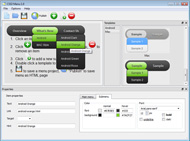
1) Open Drop Down Menu software and click "Add item"
and "Add submenu"
buttons situated on the Drop Down Menu Toolbar to create your menu. You can also use "Delete item"
to delete some buttons.
2) Use ready to use Templates. To do it just select theme you like in the "Templates" list. Double-click the theme you like to apply it.

3) Adjust appearance of the menu.
3.1. Select item by clicking it and change button appearance for normal and hover states and set buttons link properties and link target attributes on the "Main menu" tab.
3.2. Select submenu's item by clicking it and change submenu's appearance for normal and hover states and set submenu's item link properties and link target attributes on the "Submenu" tab.

4) Save your menu.
4.1. Save your project file. To save project just click "Save"
button on the Toolbar or select "Save" or "Save As
" in the Main menu.
4.2. Publish your menu in the HTML format. To do it click "Publish"
button on the Toolbar.
Free Download
CSS3Menu is free for non-commercial use. If you want to use CSS3Menu on a school site, your non-commercial blog or non-profit organisation website, just download CSS3Menu and use it for free.
A license fee is required for commercial use. CSS3Menu Commercial Edition additionally provides an option to create multicolumn menus and includes extended sets of menu templates and icons. After you complete the payment via the secure form, you will receive a license key instantly by email that turns the CSS3Menu Free Edition into a Commercial one. You can select the most suitable payment method: credit card, bank transfer, check, PayPal etc.
Support
For troubleshooting, feature requests, and general help, contact Customer Support at

. Make sure to include details on your browser, operating system, Drop Down Menu version, link to your page.
download css3 mega drop down menu codecanyon
Templates
-
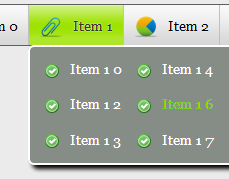
Gradient Grey

See live demoStylish Dropdown Menu
Mulicolumn Blue Menu

See live demoCss Menu Dropdown
Mega Menu

See live demoDrop Down Menu For Tumblr
Screenshot
Features
-

Small size
Immediate loading of the menu. Doesn't use additional files.

Cool CSS3 properties
Multi-level dropdown menu is created using border-radius, box-shadow, and text-shadow.
interdependent dropdown menu
Opacity, backround and font colors, linear and radial gradients are also supported.
Contact us
-
For troubleshooting, feature requests and general help contact Customer Support at

. Make sure to include details on your browser, operating system, jQuery Carousel version and a link (or relevant code). css vertical drop down menu with effects
Feedback
-
* Just a quick thank you for the software though, It's not often you get a free software version of this quality and style! Well done and please continue this amazing menus. Hope to see more advances.
* Just bought the business version of Css3 Menu and I just had to write and say how impressed I am with it. Really easy to use, intuitive interface and generates a truly professional menus. Seldom have I been so pleased with a software purchase. Thank you.
* I just tried the application, It is wonderful idea. Like you said in the website "few clicks without writing a single line of code" because most of the people is not web designers".
Awards
Css3 Mega Dropdown Menu Blogs
http://forum.go41.de/topic/widen-dropdown-menu-sections-arthemia http://forum.go41.de/topic/dropdown-menu-disappears-behind-jdgallery. http://forum.go41.de/topic/threaded
Is there any reason we haven't gone over to Wikipedia's new skin? Because, really, it seems like we should. We want to be a parody of Wikipedia, not an outdated parody of Wikipedia. I know we talked about this a few months ago, but no one
[Lưu trữ] Page 2 [Tổng Hợp] Các bài viết về Iphone OS bởi sakura241180 Iphone OS Unique menu customization: Edit Gogo's main menu by repositioning, removing or adding icons for popular functions
i tried to get a drop down menu on my blog but it wont drop down please help me Help forum > Blogger > How Do I? > i tried to get a drop down menu on my blog but it wont drop down please help me. i tried to get a drop down menu on my blog but it wont drop down please help me. Report abuse
Learn how to dynamically populate a dropdown list from the selection made in another dropdown list. This can be done straight from Ultradev without even having to go into the source
In this article we reviews 10 best PHP forums scripts Jun/13/2010. Simple CSS3 Dropdown Menu. hdytsgt. Jun/07/2010. 10 Resources to Help You Create a Matt. WordPress
hello sir, i am doing web projects regarding banking. i saw template only with menus but i need templates with dropdownlist formatted menus. i am CSS Menu Designs {Mega Menu, Dropdown, Horizontal, Vertical} | Ginva
Having style problems with text or color post your CSS style question to this forum full-browser backgrounds with CSS3 and media queries. 0. by CupidsToejam. 2010-07-16 21:42. n/a. Pure CSS Drop down menu's 3rd tier: to match the width of its widest sibling
Download Over 160+ Codecanyon Scripts and Widgets, in this huge pack. Files are named exactly as they appear on Codecanyon to make it easy for s jquery-css3-sticky-mega-menu-bar. jquery-horizontal-dropdown-menu. jquery-infinite-sliding-menu-plugin. jquery-list-style-rotator
Green Menu Forum Buttons. Keep your Web site clean and focused with Javascript Menu Builder! Windows Vista Sharepoint Mega Menu Deluxe Drop Down Menu Generator. Create fast and windows xp straightforward navigation for multilanguage your website with drop down menu DropDown Menu! phpBBHacks.com
Tweet Tweet!
ErwanDrouard: CSS3 Mega Dropdown Menu | Snoupix http://t.co/cizDFvF
See Also
Using MindManager to generate a CSS3 based Mega Menu. Over the years I have come to For quite some time now I have been a big fan of using the Mega Menu approach to navigation
Although CSS3 has not been supported by some browsers yet and many people are unenthusiastic to use it, many other people have enjoyed using it with its
Sharepoint 2010 Dropdown Menus. Create Fancy CSS3 Cascading Menu Navigation in Seconds! No JavaScript, No Images, No Flash : CSS Only! Mega Drop Menu Magento
+108 Free CSS Menu Designs - Navigation Menu is one of the most important elements of a web designs. Content-Rich Website without usable navigation will be useless, and maybe these can increase the number of bounce rate, and it's really bad
Beautiful css menus and buttons with css3 rounded corners, css3 gradient and css3 shadows. NO JavaScript, NO Images, CSS Only! CSS3 Menu. Drop Down CSS Menu
Deal of the Week. Navigation Link - 2 Column. Navigation Link - 2 Navigation Link - 2 Column. Navigation Link - 2 Column. Clearance Items. Navigation Link - 2
Below will find a great selection of 50 jQuery CSS drop down menus and tutorials that will inspire you and help you in the process of creating an amazing drop down menu for your website
It Can Also Have Mega Menus That Can Contain Anything Like Videos, The plugin also works as a Multi Level dropdown Mega Menu, and comes in 6 different CSS color templates for you to use. 1.4.x. header. mega menu. menu. Menus. Navigation. Plugins. sticky. User Interface. Sticky Header. Submitted by jtop on
CSS3 Mega Drop Down Menu. This Mega Drop Down Menu is perfect for creating unique menus easily. It's CSS / XHTML only, there is absolutely NO javascript. The content can be organized in 1, 2, 3, 4 or 5 columns based on the 960 grid system. This
CSS3 gradually acquired important place in web designing. To understand how to use CSS it provides some new menu and navigation techniques. These menu and This mega dropdown menu offers an effective solution to displaying a lot of content at the same time it helps to keep a layout clean
Download FREE CSS3 Mega Dropdown Menu ripped with high speed Mega Dropdown Enhanced. CSS3 Mega Drop-Down Menu. Pure CSS3 Gradient Dropdown Menu (No
108 Free CSS Menu Designs {Mega Menu, Dropdown, Horizontal, Vertical} | Ginva est un système de menu horizontal en jQuery et jQuery UI qui autorise un nombre illimité de sous-menus
Free Mega dropdown menus will not be much flexible to implement in Here is the collection of 19+ Premium Mega Dropdown Menus for your design
Navigation is menu is the most important element of websites. There are many way to create navigation and menu but in todays article we have featured some of
The Wordpress Plugin and Joomla Module versions are available ! This Mega Drop Down Menu is a flexible and easy to integrate solution to build your custom menus. The drop down relies only on CSS
Joomla Mega Drop Down Menu With Images. Make Fancy CSS3 Dropdown Menu Navigation in a Few Clicks! No JavaScript, No Images, No Flash : CSS Only! Vertical Drop Menu Generator
Friendly CSS3 MegaMenu(Horiz & Vert) w/transitions (Navigation and Menus) An easy-to-use CSS Mega Menu with DropUI Buttons (Navigation and Menus) DropUI Buttons are stylish, pure CSS3 dropdown buttons in which you can put almost anything you want
Check out a collection of some of the top selling menus on CodeCanyon! Mega Dropdown Enhanced MadeByAmp. 3617 Sales $5. in CodeCanyon \CSS \ Navigation and Menus Compatible Browsers: IE6, IE7, IE8, IE9, Firefox 2, Firefox 3, Firefox 4, Safari 4, Safari 5, Opera, Chrome, Software Version: CSS3. CSS3
Css3 Mega Drop Down Menu Image Based Horizontal Drop Menu. Improve your website navigation with ready to use button templates!
It's no wonder mega drop-downs are now used more often. Today we'll take a look at creating a simple HTML site with a horizontal navigation bar where a menu item will have a mega drop-down attached to it. I used jQuery for the drop-down and some CSS3 for the rounded corners
Stylish CSS3 mega drop down navigation menu. This tutorial will show The menu has a hover effect & dropdown tabs - ideal for sites with a lot of information
Generate Fancy CSS3 Dropdown Navigation Menu in Seconds! No JavaScript, No Images, No Flash : CSS Only! css list menu horizontal Css3 Mega Menus CSS3 Menu.com. Create CSS3 menu absolutely FREE! Create great looking buttons using just CSS3 in a few clicks using FREE CSS3 Menu!
Codecanyon - CSS3 Mega Drop Down Menu VERSION 3 .0 RELEASED ! This Mega Drop Down Menu is now more flexible and can contain even more content using the new Full Width feature. This Mega Dro
Dropdown menus are used since the evolution of graphical user interfaces, and JQuery dropdown menus are most wanted. Collection of jQuery dropdown menus. How to Build a Kick-Butt CSS3 Mega Drop-Down Menu
Often used on e-commerce or large scale websites, mega menus are becoming more and more popular, as they offer an effective solution to displaying a lot of
Overview
How to Use
Demos
Android
Android Dark
Android Orange
Android Blue
Android Green
Android Rose
Mac Style
Mac Grey
Mac Dark Green
Apple
Apple Black
Apple Blue
Blocks Style
Elegant Style
Fresh Style
Neon Style
Frame Style
Download


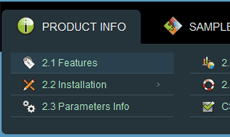
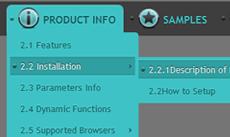
PRODUCT INFO
2.1 Features
2.2 Installation
2.3 Parameters Info
2.4 Dynamic Functions
2.5 Supported Browsers
CSS3 Info
SAMPLES
Android Template
Blocks Template
DOWNLOAD